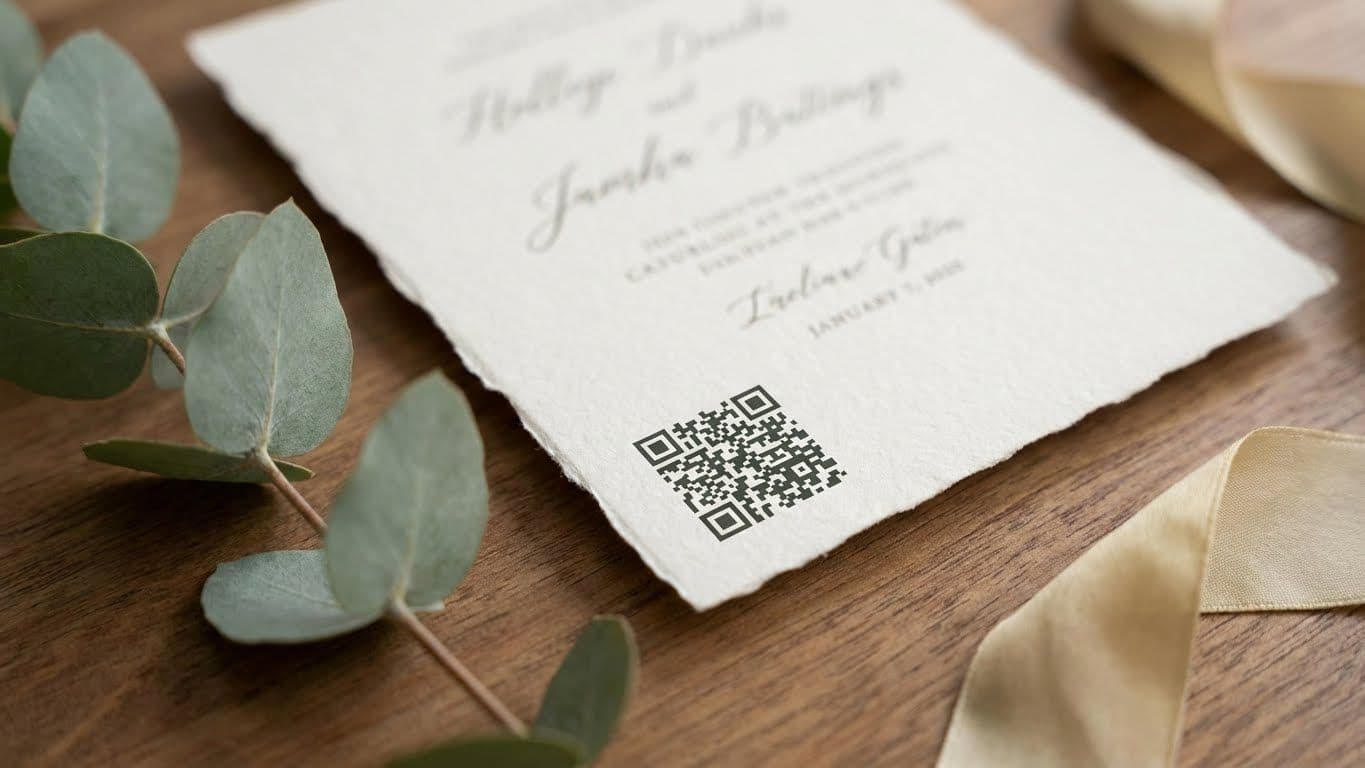
We are way past the days when wedding invites were limited to paper details. Today, most couples add digital touches to their invitations to guide their guests. And that’s where a QR code on wedding invite can help. It quickly shares maps, schedules, menus, and RSVP pages in one simple scan.
Don't know how to make digital wedding invites? No problem. This guide breaks the process into clear, quick steps. So, you can easily place and test your QR code without stress. The goal is clarity for guests and peace of mind for you. Let’s get started!
Step-by-Step Process: Generating a Ready QR Code for Wedding Invites on Fotny
Yes, it sounds technical to add QR code on wedding invites. But Fotny makes the process a breeze. Just follow these steps and you will stay in control of the process. You can access the platform here: Fotny
Step 1: Access Fotny and Log In
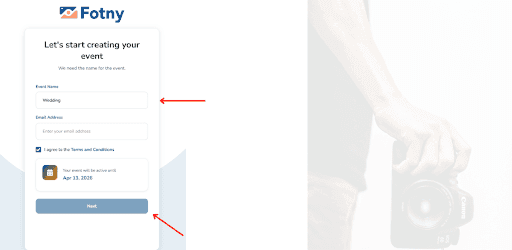
Open the Fotny web app or simply access it from here. Here’s what to do next:
- Enter the Event Name and your Email Address in the designated fields.
- Next, check the box next to I agree to the Terms and Conditions.
- Click the Next button to proceed to the next step.
Now, you will be asked to select the pricing plan. You can start with a free plan or choose a premium package for more features.
Step 2: Set Up Your Event
Fotny lets you customize your event, so your wedding invite stands out. Here’s what you can do:
- Click Upload from the dashboard to add photos to your event. For example you can upload an informal wedding invite here.
- Do you want to give your event an identity? Select the Profile option to add a unique name and profile photo for the space.
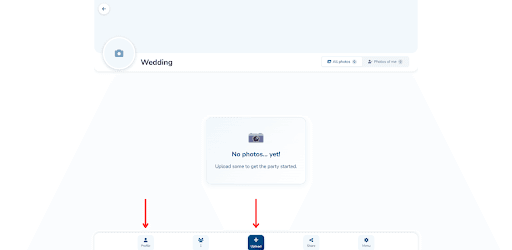
A little customization goes a long way in making your event space vibrant and shareable. If you want to see what customization and controls are included, visit Fotny Features.
Step 3: Generate & Send QR Code
Let’s cut to the chase. Here’s how you can quickly generate personalized wedding QR codes:
- Click the Share button from the dashboard.
- A window will pop up and automatically generate a QR code for wedding RSVP.
- You can download the QR code as an image or share it as a link. Simply click the Share button to get a shareable link.
- Otherwise, you can directly send the code via email.
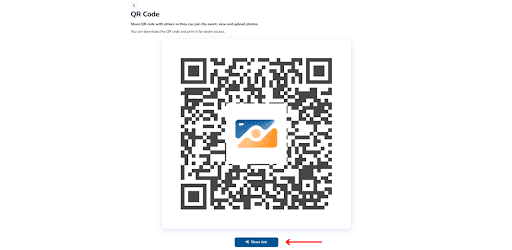
Test the QR code before sending it out to ensure it works seamlessly. Once ready, add it to your printed or digital invites. For the complete QR sharing flow, you can refer to How Fotny Works.
Step 4: Change Event Settings
Do you want to adjust your event details? Fotny helps with that, too. Here’s what to do:
- Click the Menu button from the dashboard.
- Next, select Event Settings from the menu.
- You can now easily change your event settings, such as theme, name, or cover image.
- Similarly, you can toggle privacy settings such as feed visibility, upload permissions, and password protection.
These settings add a personal touch to your event space. Going the extra mile can make your wedding invites more memorable. For details about privacy and data handling, review Fotny Privacy Policy.
Step 5: Deactivate Your Event
Done with the event? You can quickly deactivate the event and its QR code in Fotny. Here’s how:
- Select Deactivate Event from the More menu.
- Click the Deactivate button in the dialogue box.
Fotny lets you deactivate your event with a single click. It keeps your digital space organized and secure, preventing guests from accessing outdated information. You can also reactivate your event at any time.
Best Practices for QR Code on Wedding Invite - Tips for Maximum Engagement
Maximum engagement with the wedding QR code generator starts with removing friction between hosts and guests. More people participate easily when sharing feels easy. Moments also stay alive long after the event ends. These best practices for QR codes on wedding invites focus on simplicity, accessibility and trust. So, your guests feel welcomed.
Focus on Technical Simplicity
Guests should never feel confused or overwhelmed. Consider using tools like Fotny that remove technical barriers. Such platforms do not require design skills or lengthy technical setups. Therefore, hosts can place the code directly on invites with confidence.
Ensure Broad Compatibility
Scanning should work the same way for everyone. Platforms like Fotny provide QR codes formatted for consistent scanning. That means you can use or share the codes across smartphones and scan with default camera apps. Also, clean printing matters. Proper sizing and clear contrast help avoid failed scans, which can lead to drop-offs at events.
If you want general placement ideas for printed invites, you can read this guide: Vistaprint: Save the Date QR Codes.
Choose a Proven Platform
Think of it this way. Would you open a suspicious link? Trust builds participation. Generate QR codes with trusted apps such as Fotny, which already supports over 2,000 event hosts. This allows your guests to feel more comfortable using the platform.
Guide Guests with Clear Cues
Remember, not all your guests are tech savvy. You can place a short, friendly instruction near the QR code so guests know exactly what to do. This simple guidance encourages scan behavior and participation.
Prioritize User Convenience
Fewer steps are always better. Your guests should not feel the need to download apps or create lengthy accounts. A single scan should take them directly to the event space, as with Fotny. So, they can instantly upload or view photos.
Why Fotny is the Best Choice for QR Code on Wedding Invite
Your wedding moments deserve care not complexity. Fotny makes it simple and smooth to add QR code on wedding invite. Let’s see why it is the best choice:
Ready Made and Stress Free
Fotny acts as a wedding QR code generator that gives you a high-res code that always works. No tech headaches. No long setups. The tool only takes seconds to generate a functional QR code.
Shows Up Everywhere Guests Look
You can use the same code on the save-the-dates, table design stickers, or inserts. These personalized wedding QR codes feel intentional and help guests know exactly what to scan.
One Scan Does the Magic
Guests can handle QR code RSVP or upload photos in one place. There is no need for lengthy login processes. This kind of RSVP automation keeps things moving and avoids follow ups.
AI Features & Smart Controls
Fotny offers AI-powered face recognition and content moderation. It automates features to keep things organized. You also get privacy controls to keep things in your hands.
Trusted and Proven
More than 2,000 hosts already use Fotny. Events are already seeing even more photo uploads. It is a trusted platform that keeps your event space simple, fun, and guest-friendly. For wedding-focused galleries, see Celebrations.
Fotny is also widely used for other event types like Professional Photographers, Conferences, and Sports Events.
FAQs About QR Code on Wedding Invite
How do I create a QR Code for my Wedding?
You can create a QR code for your wedding with a QR code generator like Fotny. All you need to do is upload your event details and add photos. The platform automatically generates a high resolution QR code. You can add it to digital wedding invites or printed cards without any technical skills.
What are the Benefits of using QR Codes on Wedding Invitations?
Some benefits of using QR codes on wedding invitations include simplicity and accessibility. A single scan handles QR code RSVP photo uploads and event details. Couples can use QR codes to improve participation. It also reduces printing clutter and supports RSVP automation with less manual follow up.
Can QR Codes be Customized for Wedding Themes?
Yes, personalized wedding QR codes can match your wedding style. Many advanced tools let you adjust color and placement. So, the placement can blend naturally with modern wedding invitation ideas. This keeps the invite aesthetically pleasing while still providing a clear scan point for guests.
Are QR Codes on Wedding Invites Safe and Private?
Yes, QR codes on wedding invites are safe and private. The key is to use a trusted platform like Fotny. It includes privacy controls like content visibility, permissions, and password protection. Guests can scan to access wedding photos without an account. You can also deactivate your account after the event for peace of mind.